How to choose shipping software for a small business
What shipping software does, which features matter for a small online store, and when free tools are enough. A plain-English checklist before you pay.
Some links on this page may be affiliate links. If you buy through them we may earn a commission, at no extra cost to you. How this works.
If you print labels one by one from a carrier’s website, copy addresses by hand and paste tracking numbers back into your store, shipping software can give you hours back every week. But not every shop needs it yet, and the most popular tool is not always the right one for a small seller.
This guide explains what shipping software does, the questions to ask before you choose, and the kinds of tools that fit different stages of a small online business.
What shipping software actually does
Most shipping tools do the same core job:
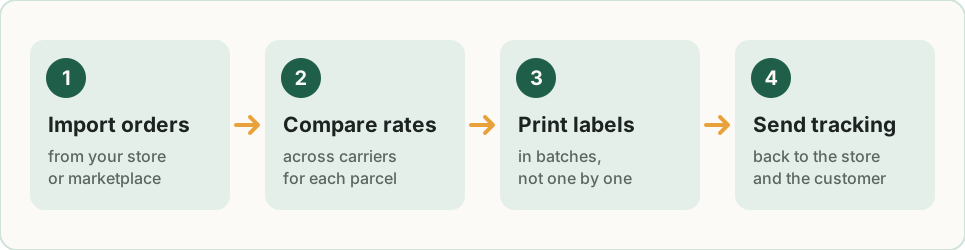
- Import orders from your store or marketplace (Shopify, Etsy, eBay, WooCommerce, Amazon and others).
- Compare rates across one or more carriers for each parcel.
- Buy and print labels in batches instead of one at a time.
- Send tracking numbers back to your store, which notifies the customer.
On top of that, many tools add discounted carrier rates, packing slips, return labels, branded tracking pages, automation rules (“all orders under 1 lb go First Class”) and customs forms for international parcels.
Do you need it yet?
A quick test: count how many orders you ship in a typical week and how long each one takes from “order received” to “label on the box”.
- Under about 10 orders a week, printing labels from your store’s built-in shipping feature or the carrier’s site is often fine. Many store platforms already include discounted labels.
- From roughly 10 to 50 orders a week, batch printing and automatic tracking updates start to save real time. A free or low-cost tool usually covers this.
- Beyond that, or if you sell on several channels, a tool that pulls orders from every channel into one queue is usually worth paying for.
These are rough ranges, not rules. If shipping already feels like your biggest daily chore, that is the signal that matters.
Seven questions to ask before you choose
1. Does it connect to where you sell?
Check that the tool has a ready-made integration with every store and marketplace you use today, and the ones you plan to add. A missing integration means manual imports, which defeats the purpose.
2. Which carriers does it support in your country?
Shipping software is very local. A tool that is excellent in the United States may support few carriers elsewhere. List the carriers your customers expect and check each one.
3. How is it priced?
There are three common models:
| Pricing model | How it works | Good for |
|---|---|---|
| Free, pay per label | No subscription; you pay postage (sometimes with a small fee per label) | Low or irregular volume |
| Monthly subscription | Fixed fee, often tiered by number of shipments or users | Steady volume, several channels |
| Per-label fee | A small charge on every label on top of postage | Medium volume without a subscription |
Work out the total cost at your real monthly volume, not just the headline price.
4. Are the discounted rates real for your parcels?
Many tools advertise large discounts compared with retail carrier prices. Those savings depend on parcel weight, size and destination. Run five or ten of your recent orders through the rate calculator before you commit. For more ideas, see our nine ways to reduce shipping costs.
5. Can it handle international orders?
If you ship abroad, look for automatic customs forms, duty and tax estimates shown at checkout, and clear rules for restricted items. International shipping is where good software saves the most headaches. Our international shipping checklist covers the paperwork step by step.
6. How easy are returns?
Returns are part of selling online. Check whether you can create a return label in a couple of clicks, or offer customers a self-service returns page. See how to handle returns for the full process.
7. What happens when something goes wrong?
Lost parcels, address errors and carrier delays happen. Look at what support is included on the plan you can afford: email only, chat, or phone.
Types of tools to look at
Rather than a ranking, here are the kinds of tools small sellers usually consider. Always check the current plans on each vendor’s website, as prices and features change often.
- Free label tools. Pirate Ship is a popular free option for sellers shipping from the United States with USPS and UPS. It is simple and focused on labels rather than full order management.
- Pay-as-you-go platforms. Shippo lets you start without a big monthly commitment and grow into paid plans. It suits sellers whose volume is still changing.
- Multichannel order management. ShipStation is built for sellers who manage orders from several stores and marketplaces and want automation rules. It is a paid subscription, so it makes more sense once volume is steady.
- International-first tools. Easyship focuses on cross-border shipping, with duties and taxes calculated up front. It is worth a look if a big share of your orders go abroad.
For current prices and limits, see the best shipping software for small business and our detailed ShipStation vs Pirate Ship vs Shippo comparison.
A simple way to decide
- Write down your weekly order count, your sales channels and your top three destinations.
- Shortlist two tools that support all of them.
- Sign up for the free plan or trial of each and ship a real week of orders.
- Keep the one that saved the most time, not the one with the longest feature list.
Tip: Before switching, check what your store platform already includes. Some platforms offer discounted labels and tracking emails for free, which may be enough for now.
Key takeaways
- Shipping software saves time by importing orders, comparing rates, batch printing labels and sending tracking back automatically.
- Small, irregular volume often does not need a paid tool yet.
- Check integrations and local carriers first, then compare total cost at your real volume.
- Test with real orders before you commit to a subscription.
Related guides
Best shipping software for small business: 5 options compared
The best shipping software for a small business depends on volume and carriers. Pirate Ship, Shippo, ShipStation, Easyship and built-in store labels compared.
The cheapest way to ship packages for a small business
The cheapest way to ship a package depends on weight, size and distance. See which service usually wins for each parcel type, and how to get discounted rates.

How to calculate dimensional weight (DIM weight) for shipping
The dimensional weight formula with examples in inches and centimetres, the divisors UPS, FedEx, USPS and DHL use, and how to lower your billable weight.